Billing / Transmissions / Options
Modified on: Wed, 29 Jan, 2025 at 1:35 PM
Description
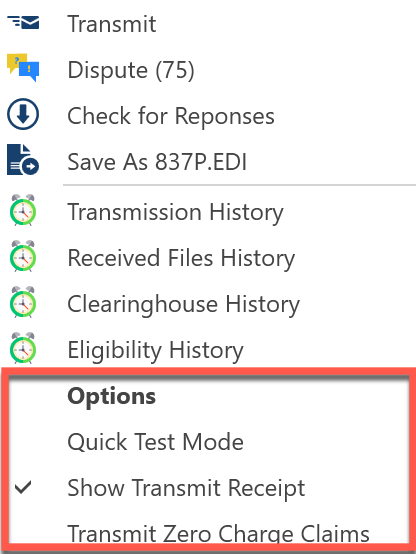
Options that when selected perform their functionality.
Access
Through Main Menu
- On the main screen, click on the Billing button.
- Then, press the Transmissions button, located at the top of the screen, and select the options according to your preference.
Through QuickLinks
- On the main screen, click on the QuickLinks text located at the top of the screen and select the Billing option.
- Then, press the Transmissions button located at the top of the screen and select the options according to your preference.
Through Patients
- On the Patient Details screen, press the Billing button located at the top of the screen and select the Go To Billing option.
- Then, press the Transmissions button located at the top of the screen and select the options according to your preference.
Through Appointments
- On the Appointments screen, press the Billing button located at the top of the screen and select the Go To Billing option.
- Then press the Transmissions button located at the top of the screen and select the options according to your preference.
Options
- Quick Test Mode: When selected, allows you to send the selected claims for evaluation only.
- Show Transmit Receipt: When selected, allows the transmission of claims to display the receipt of the transmission.
- Transmit Zero Charge Claims: When selected, it will allow the system to transmit the electronic claims and that the service charge is 0.00
Did you find it helpful? Yes No
Can you please tell us how we can improve this article?